Notice [NOTICE] The visa confirmation email for the visa application is no longer provided - HOW TO PRINT OUT YOUR VISA AT HOME
- DATE
- 2026-01-02
Due to the high volume of visa applicants, our consulate no longer provides the visa confirmation email services for visa applicants.
*If the application has problems, we will call or email the applicant.
Therefore, if you can not find any visa information after your visa type processing time(3-4 weeks), you can contact our consulate by phone (206-441-1011/4) or email seattle0404@mofa.go.kr
Accordingly, all visa applicants who applied for a visa should check their visa status on the Korean Visa Portal (https://www.visa.go.kr/openPage.do?MENU_ID=10301) without the confirmation Email.
* Check Application Status - Check Application Status & Print
** Type of applications : Diplomatic Office
Select : Passport No.
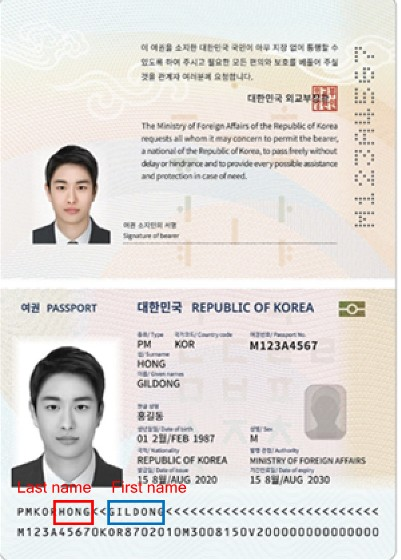
* NOTE (Common mistakes)*
If you can not find your visa status information on the visa portal, it is most likely because you entered your passport name incorrectly.
The correct way is:
Date of Birth: YYYYMMDD
Name on passport: Doe John or Doe Jane (*Last name First name )
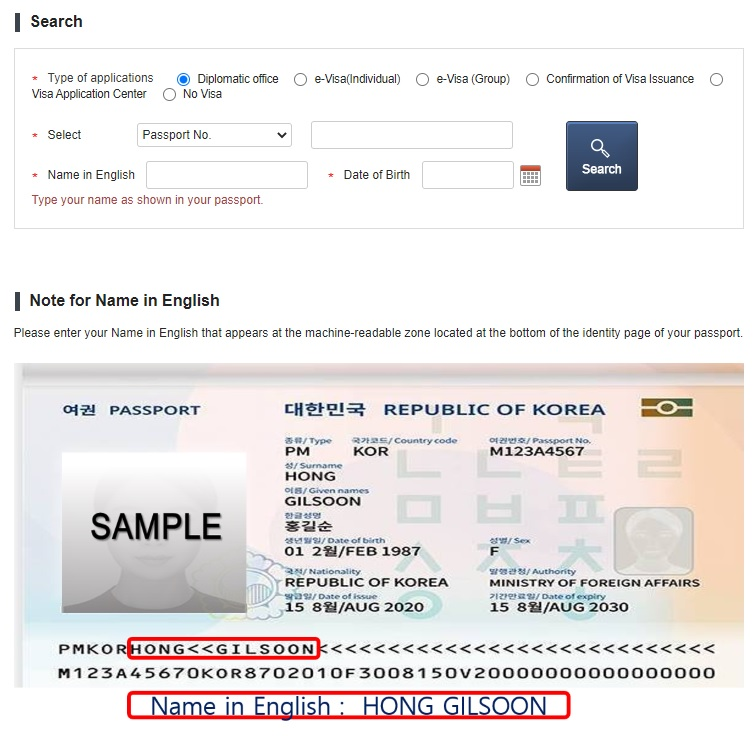
[Search only by name written on the bottom area of the passport]
As shown in the photo, the last name is in front of the '<<' shape at the bottom area of the passport, and the first name is in the back.
If your name has a - (hyphen), a space can be used instead of a hyphen.
*Even if there is a middle name at the top of the passport, if the name is not listed at the bottom area, it should not be included when you fill out your name in the search for your visa status.
※ Please check if all the information on your Visa Grant Notice is correct